
What exactly is a file, anyway?
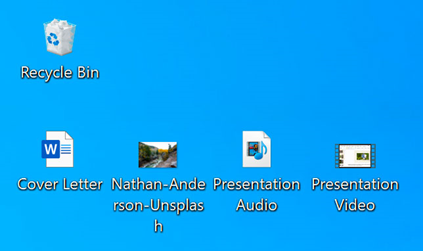
The simplest definition of a file is “A group of information that is processed by a computer as a single unit.”
You can use many different kinds of files. For example, colour images, digital music, digital videos, and Microsoft Word documents are all types of files. You also could think of a file as a digital copy of something real that you can use on your computer. When you use various programs, you often look at, make, or change files.
Usually, a file is shown by an icon. In the picture below, you can see a variety of files on the desktop below the Recycle Bin.
File Types and Formats:
- Files can be categorized into different types and formats based on their content and purpose. Common file types include documents (e.g., .docx, .pdf), images (e.g., .jpg, .png), videos (e.g., .mp4, .avi), audio (e.g., .mp3, .wav), and more.
- Each file type has its own unique format and structure, which determines how the data is stored and interpreted by software applications.
File Management:
- File management involves organizing, storing, and manipulating files and folders on a computer or storage device. Effective file management practices help users maintain a structured and accessible file system.
- This includes tasks such as creating, renaming, moving, copying, deleting, and organizing files and folders using file management tools like File Explorer in Windows or Finder on macOS.
File Associations:
- File associations specify which program should be used to open a particular type of file. For example, a .docx file is typically associated with Microsoft Word, so double-clicking on a .docx file will open it in Word.
- Users can change file associations to specify a different default program for opening specific file types, providing flexibility in how files are accessed and edited.
File Attributes:
- File attributes are properties or metadata associated with a file, such as its name, size, type, creation date, modification date, and file permissions.
- Understanding file attributes can help users track and manage files more effectively, enabling them to organize and prioritize files based on different criteria.
File Sharing and Collaboration:
- Files can be shared and collaborated on among multiple users, either locally within a network or globally over the internet. This allows for seamless collaboration on projects, document sharing, and version control.
- Cloud storage services, email attachments, file sharing platforms, and collaborative document editing tools facilitate file sharing and collaboration among users.
File Security and Backup:
- Ensuring the security and integrity of files is essential to protect sensitive information and prevent data loss. Users can implement file security measures such as encryption, password protection, and regular backups to safeguard their files against unauthorized access and hardware failures.
By understanding the various aspects of files and their management, users can effectively utilize digital information to enhance productivity, creativity, and communication in their computing activities.
