
Using your mouse
Track Your Course Progress
You are currently studying as a guest. Your course progress and quiz results will not be saved unless you login to your EduCourse account. Login to track your progress and qualify for your certificate.
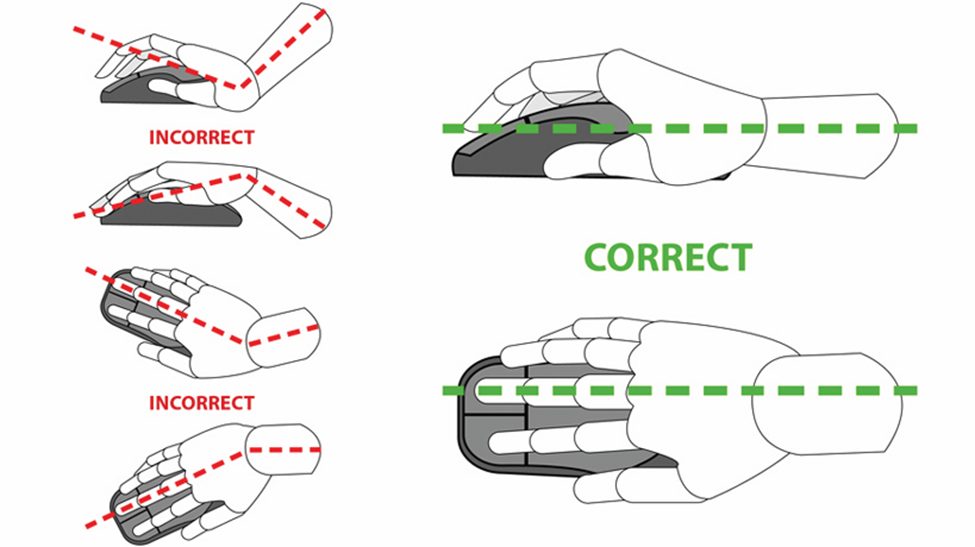
It is essential that you handle your mouse in a manner that is comfortable and prevents arm, wrist, and hand strain. You should be able to grasp and operate your mouse with minimum effort, allowing it to glide effortlessly around your desk or mouse pad.
Here are some additional points to support this:
1. Mouse Sensitivity:
- Adjust the sensitivity of your mouse to a level that requires minimal effort to move the cursor across the screen. A higher sensitivity may reduce the need for excessive arm movement and allow for more precise control with smaller wrist movements.
2. Mouse Placement:
- Position the mouse within easy reach of your dominant hand, so you don’t have to stretch or strain to reach it. This helps maintain a comfortable posture and reduces the risk of overextending your arm.
3. Grip Pressure:
- Hold the mouse with a relaxed grip, using only enough pressure to maintain control without gripping too tightly. Excessive grip pressure can lead to muscle tension and fatigue in the fingers and hand.
4. Smooth Movement:
- Move the mouse smoothly and effortlessly across your desk or mouse pad, avoiding abrupt or jerky movements. This not only reduces strain on the hand and wrist but also promotes better accuracy and precision in cursor movement.
5. Wrist Support:
- Consider using a mouse pad with an integrated wrist rest or a separate ergonomic wrist rest to provide support and cushioning for your wrist during prolonged mouse use. This helps maintain a neutral wrist position and reduces pressure on the wrist joint.
6. Posture Awareness:
- Pay attention to your posture while using the mouse, ensuring that your arm, wrist, and hand are aligned in a comfortable and neutral position. Avoid slouching or leaning forward, as this can increase strain on the upper body.
7. Breaks and Stretching:
- Take regular breaks from using the mouse to rest and stretch your fingers, hands, wrists, and arms. Perform simple stretching exercises to relieve tension and improve circulation in these areas.
8. Ergonomic Mouse Design:
- Choose an ergonomic mouse that fits comfortably in your hand and supports a natural grip posture. Ergonomic features such as contoured shapes, textured surfaces, and customizable buttons can help reduce strain and discomfort during prolonged use.
9. Monitor Symptoms:
- Pay attention to any signs of discomfort or strain in your arm, wrist, or hand while using the mouse. If you experience persistent pain or discomfort, take a break and consider adjusting your mouse setup or seeking ergonomic advice.
By handling your mouse with care and attention to ergonomic principles, you can minimize strain and discomfort while maximizing comfort and efficiency in your computer work.
