
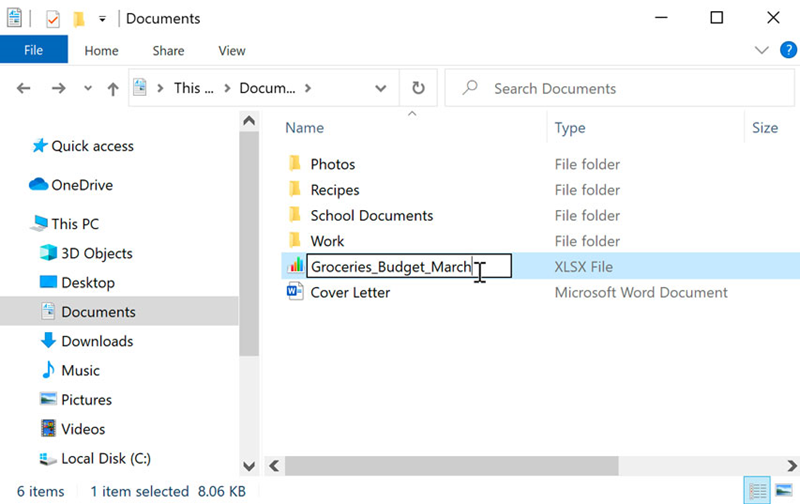
To rename a file or folder:
Track Your Course Progress
You are currently studying as a guest. Your course progress and quiz results will not be saved unless you login to your EduCourse account. Login to track your progress and qualify for your certificate.
Any file or folder’s name can be changed. It will be better at remembering what kind of information is in the file or folder if it has a unique name.
- Click the file or folder, wait about a second, and then click it again. A text field that can be changed will show up.
- Type the name you want and press the Enter key. It will get a new name.
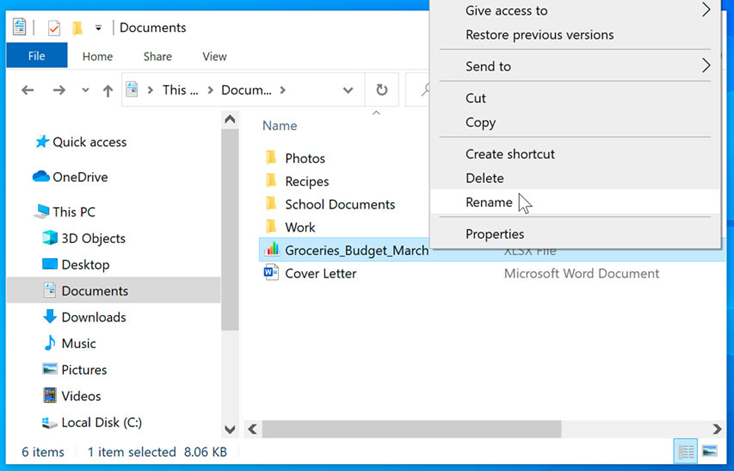
Tip: You can also right-click the folder and choose Rename from the menu bar that shows up.
Best Practices for Renaming Files and Folders:
- When renaming files or folders, consider using descriptive and meaningful names that accurately reflect the content or purpose of the file. This can help you quickly identify and locate specific files later.
- Use concise and clear naming conventions to maintain consistency across your file system. For example, you might include relevant keywords or dates in the file names to facilitate sorting and searching.
- Avoid using special characters, symbols, or spaces in file names, as these can sometimes cause compatibility issues or make it harder to work with files in certain software applications or operating systems.
- If you need to distinguish between multiple versions of a file or folder, consider appending a version number or date to the name (e.g., “Report_v1”, “Report_v2”, “Report_2024-05-24”).
- Be mindful of file extensions when renaming files. Changing the extension of a file (e.g., from “.txt” to “.docx”) can alter how the file is interpreted by software programs. Only modify file extensions if you’re certain it won’t affect the file’s compatibility or functionality.
- Review and update file names periodically to ensure they remain relevant and organized as your digital content evolves over time. Renaming files and folders as needed can help you maintain a tidy and efficient file system.
By following these best practices, you can effectively rename files and folders in a way that enhances organization, accessibility, and usability within your digital environment.
