
Letters and numbers
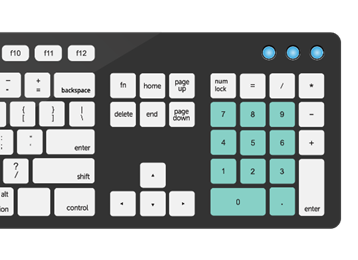
The letters are positioned in the center of the keyboard, while the digits are located directly above them. Some bigger keyboards contain a Quantity pad on the far right, which is useful for entering a large number of numbers.
Letters and numbers are fundamental characters used in written communication and data input. On a standard computer keyboard, letters and numbers are arranged in distinct sections for efficient typing. Here’s an overview:
1. Letters (Alphabetic Characters):
- Letters are symbols representing the sounds of speech and are used to form words, sentences, and paragraphs in written language.
- In English and many other languages, the alphabet consists of 26 letters, from A to Z, both uppercase (capital) and lowercase.
- Uppercase letters are typically used at the beginning of sentences, proper nouns, and acronyms, while lowercase letters are used for general text.
- Letters are arranged in alphabetical order on a computer keyboard, with the lowercase letters typically located on the main keyboard area and uppercase letters accessible by pressing the Shift key simultaneously.
2. Numbers (Numeric Characters):
- Numbers are symbols representing quantities, values, or positions in numerical form.
- In the decimal number system, there are ten numeric characters: 0, 1, 2, 3, 4, 5, 6, 7, 8, and 9.
- Numbers are used for counting, measuring, calculating, and representing data in various contexts, such as mathematics, finance, science, and everyday life.
- Numeric characters are arranged in a dedicated numeric keypad on the right side of a standard computer keyboard, providing easy access for numeric input and arithmetic operations.
3. Alphanumeric Characters:
- Alphanumeric characters refer to a combination of letters and numbers used together in text or data.
- Alphanumeric characters are commonly used in passwords, usernames, product codes, serial numbers, and other identifiers that include both letters and numbers.
- On a computer keyboard, alphanumeric characters are accessible from the main keyboard area and the numeric keypad, allowing users to input both letters and numbers seamlessly.
4. Shift Key for Uppercase Letters:
- The Shift key is used to type uppercase (capital) letters on a keyboard. Pressing and holding the Shift key while simultaneously pressing a letter key produces the corresponding uppercase letter.
- For example, pressing Shift + A produces “A” (uppercase “A”), while pressing A alone produces “a” (lowercase “a”).
5. Numeric Keypad for Numbers:
- The numeric keypad, located on the right side of a standard keyboard, provides a convenient layout for entering numeric data quickly.
- Numeric characters, arithmetic operators (+, -, *, /), and the decimal point (.) are accessible from the numeric keypad for efficient numeric input and calculations.
In summary, letters and numbers are essential characters used in written language, data input, and numerical calculations. Understanding their arrangement and usage on a computer keyboard enables efficient typing and communication in various contexts.
