
Punctuation and special characters
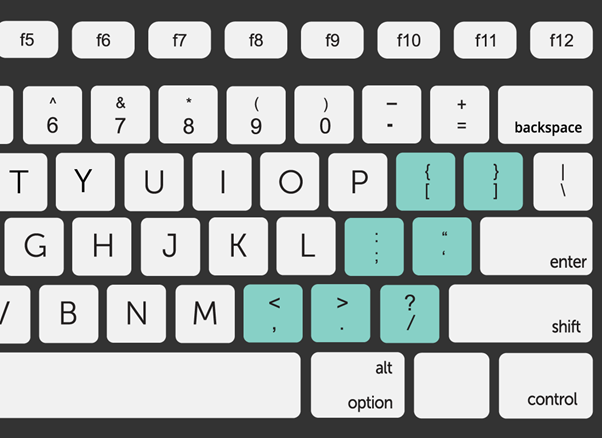
While typing on a computer, it is just as vital to use punctuation as it is when writing by hand. Occasionally, you may also have to input special characters. Most keyboards feature specific symbols and punctuation on shared keys, which may be odd at first, but you will quickly acquire used to their position as you use the keyboard more.
Punctuation and special characters on a computer keyboard are symbols and glyphs that are used to enhance written communication, input data, and perform specific functions on a computer. Here’s an overview:
1. Standard Punctuation Marks:
- Standard punctuation marks found on computer keyboards include:
- Period (.)
- Comma (,)
- Question mark (?)
- Exclamation point (!)
- Colon (:)
- Semicolon (;)
- Quotation marks (” “)
- Apostrophe (‘)
- Hyphen (-)
- Dash (—)
- Parentheses ( )
- Brackets [ ]
- Ellipsis (…)
2. Numeric Keypad:
- The numeric keypad, typically located on the right side of the keyboard, contains additional punctuation marks, such as:
- Plus sign (+)
- Minus sign (-)
- Asterisk (*)
- Forward slash (/)
- Equals sign (=)
- Decimal point (.)
3. Special Characters:
- Special characters found on computer keyboards include:
- Currency symbols ($, €, £, ¥)
- Mathematical symbols (+, −, ×, ÷, =)
- Copyright symbol (©)
- Trademark symbol (™)
- Registered trademark symbol (®)
- Degree symbol (°)
- Emoticons and emoji (?, ❤️, ?)
- Arrows (←, →, ↑, ↓)
- Bullets and other list markers (•, ◦, ▪)
4. Function Keys (F1-F12):
- Function keys, labeled F1 through F12, may also serve special functions or access specific features in software applications, such as:
- F1: Help
- F2: Rename
- F3: Search
- F4: Open address bar
- F5: Refresh
- F6: Move cursor to address bar
- F7: Spell check
- F8: Extend selection
- F9: Refresh document
- F10: Activate menu bar
- F11: Toggle full-screen mode
- F12: Open developer tools
5. Keyboard Shortcuts:
- Keyboard shortcuts combine one or more keys, including modifier keys (Ctrl, Alt, Shift), with alphanumeric keys or function keys to perform specific actions or commands quickly. For example:
- Ctrl + C: Copy
- Ctrl + V: Paste
- Ctrl + Z: Undo
- Ctrl + F: Find
- Alt + Tab: Switch between open windows
- Windows key + D: Show desktop
6. Modifier Keys:
- Modifier keys (Ctrl, Alt, Shift) are used in combination with other keys to modify their output or trigger specific functions. For example:
- Shift + [key]: Type uppercase letters or access alternate characters.
- Ctrl + [key]: Perform various keyboard shortcuts or commands within software applications.
- Alt + [key]: Access alternate functions or commands.
In summary, punctuation and special characters on a computer keyboard serve various functions in inputting text, executing commands, and navigating software applications. Understanding how to access and use these characters efficiently enhances productivity and facilitates effective communication on a computer.
