
The number keys
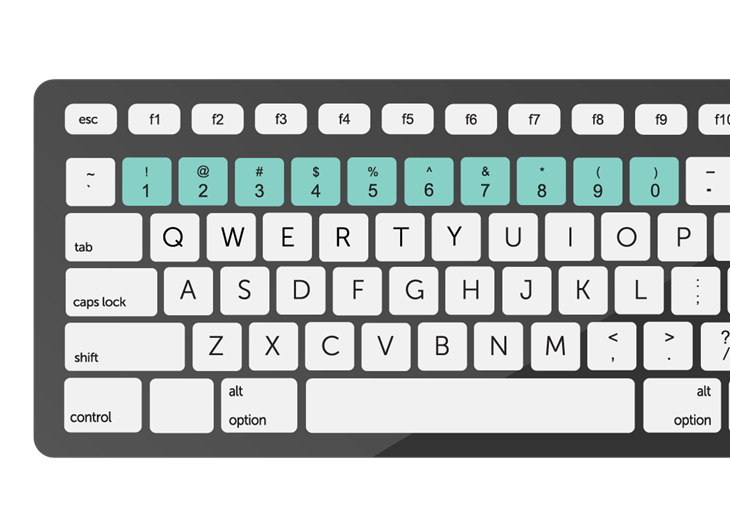
When your keyboard does not have a numeric keypad, you may input numbers by hitting the number keys placed above the letter keys.
The number keys, often referred to as the numeric keypad or simply the “numbers,” are a set of keys on a computer keyboard arranged in a grid-like layout. These keys are used to input numeric data, perform mathematical calculations, and navigate through documents or spreadsheets. Here’s an overview of the number keys:
1. Layout:
- The number keys are typically arranged in a grid layout, usually located on the right side of the keyboard.
- The layout resembles a calculator’s numeric keypad, with digits 0 through 9 arranged in three rows.
2. Numeric Input:
- The primary function of the number keys is to input numeric data. Users can type numbers from 0 to 9 by pressing the corresponding keys.
3. Arithmetic Operations:
- In addition to inputting numbers, the number keys can be used to perform basic arithmetic operations:
- Plus (+): Adds two numbers together.
- Minus (-): Subtracts one number from another.
- Asterisk (*): Multiplies two numbers.
- Forward Slash (/): Divides one number by another.
- Equals (=): Computes the result of an arithmetic expression.
4. Decimal Point:
- The decimal point (.) key, often located beside the zero (0) key, is used to input decimal numbers and perform calculations involving fractional parts.
5. Navigation:
- In some applications, the number keys can be used for navigation within documents, spreadsheets, or web pages. For example, pressing the Page Up or Page Down keys may move the cursor up or down by a specified number of lines or pages.
6. Num Lock:
- The Num Lock key, located near the number keys, toggles the functionality of the numeric keypad. When Num Lock is on, pressing the number keys inputs numeric characters. When Num Lock is off, these keys may serve other functions, such as navigation or editing.
7. Numeric Keypad vs. Number Row:
- Some keyboards feature a dedicated numeric keypad, separate from the main alphanumeric keys. This numeric keypad provides easy access to number input and arithmetic functions.
- In contrast, laptops and compact keyboards may incorporate number keys into the top row of alphanumeric keys, usually above the letter keys.
8. Calculator Functions:
- The number keys, when combined with modifier keys (e.g., Ctrl, Alt), can emulate the functions of a basic calculator. For example, pressing Ctrl + Alt + Delete may open the Windows Task Manager or trigger other system functions.
In summary, the number keys on a computer keyboard provide a convenient means of inputting numeric data, performing calculations, and navigating through documents or spreadsheets. Understanding their layout and functionality enhances productivity and efficiency when working with numbers on a computer.
