
Where to find USB ports for flash drives and CD/DVD drives
Track Your Course Progress
You are currently studying as a guest. Your course progress and quiz results will not be saved unless you login to your EduCourse account. Login to track your progress and qualify for your certificate.
A USB drive needs to go into the computer’s USB port, while a CD or DVD goes into the CD/DVD drive, as seen in the photos below.
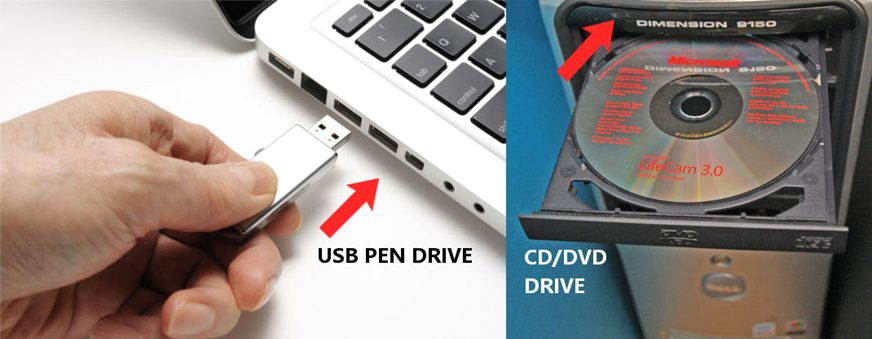
1. Front Panel:
- Many desktop computers have USB ports conveniently located on the front panel of the computer case. These ports are easily accessible and are often used for connecting flash drives, external hard drives, and other USB devices.
2. Back Panel:
- The back panel of a desktop computer usually has multiple USB ports as well. These ports are located on the rear of the computer case and are commonly used for connecting peripherals like printers, keyboards, and mice.
3. Side Panel:
- Some desktop computers may have USB ports located on the side panel of the computer case. These ports are also easily accessible and can be used for connecting USB devices without having to reach around to the back of the computer.
4. Laptop Sides:
- On laptops, USB ports are typically located on the sides of the device. Laptops may have USB ports on both the left and right sides, providing flexibility for connecting USB devices.
5. External USB Hubs:
- If you need additional USB ports for connecting multiple devices, you can use an external USB hub. These hubs plug into a single USB port on your computer and provide multiple additional USB ports for connecting flash drives, external drives, and other devices.
6. CD/DVD Drive Bay:
- CD/DVD drives are usually located on the front panel of a desktop computer case. The drive bay is a slot where you can insert CDs or DVDs for reading or writing data. Some computer cases may have multiple drive bays for additional CD/DVD drives or other optical drives.
7. External CD/DVD Drives:
- If your computer doesn’t have an internal CD/DVD drive, or if you need to use a CD/DVD drive with a laptop, you can use an external CD/DVD drive. These drives connect to your computer via a USB cable and can be used to read or write CDs and DVDs.
By locating the USB ports and CD/DVD drives on your computer or laptop, you can easily connect USB devices and optical media for data transfer, storage, and other purposes.
