
Common external accessories
Track Your Course Progress
You are currently studying as a guest. Your course progress and quiz results will not be saved unless you login to your EduCourse account. Login to track your progress and qualify for your certificate.
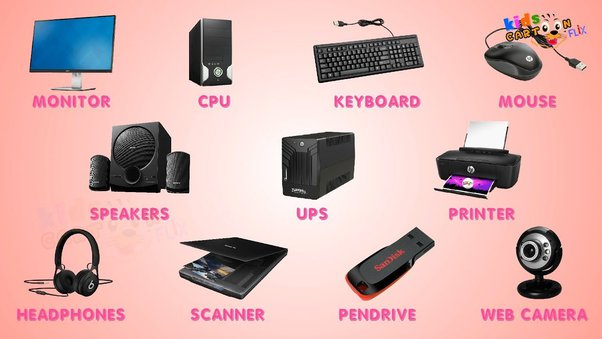
Common external accessories for computers include a wide range of peripherals and devices that enhance functionality, connectivity, and user experience. Here’s an overview of some common external accessories:
1. External Storage Devices:
- USB Flash Drives: Portable storage devices for transferring and storing files between computers. They are small, lightweight, and offer varying storage capacities.
- External Hard Drives: High-capacity storage solutions for backing up files, expanding storage space, and archiving data. They connect to computers via USB, Thunderbolt, or eSATA ports.
2. Input Devices:
- Keyboards: External keyboards offer ergonomic designs, mechanical key switches, and customizable features for comfortable typing and enhanced productivity.
- Mice: External mice come in various designs, including wired and wireless options, gaming mice with customizable buttons and DPI settings, and ergonomic mice for enhanced comfort during extended use.
- Graphics Tablets: Input devices for digital artists and designers, allowing for precise drawing and handwriting input using a stylus or pen.
3. Audio Devices:
- Headphones: External headphones provide high-quality audio for immersive listening experiences, gaming, and communication. They may feature noise cancellation, wireless connectivity, and built-in microphones.
- Speakers: External speakers produce audio output for music, movies, gaming, and multimedia content. They range from compact desktop speakers to high-fidelity bookshelf speakers and surround sound systems.
4. Displays and Monitors:
- External Monitors: Additional monitors for expanding screen real estate, multitasking, and enhancing productivity. They come in various sizes, resolutions, and panel types (e.g., IPS, TN, VA).
- Projectors: External projectors display images and videos on large screens or surfaces for presentations, entertainment, and educational purposes. They are commonly used in classrooms, conference rooms, and home theaters.
5. Networking Devices:
- Wi-Fi Routers: External routers provide wireless internet connectivity and network access for computers, smartphones, tablets, and other devices. They may feature dual-band, mesh networking, and advanced security features.
- Ethernet Switches: External switches expand wired network connectivity by providing additional Ethernet ports for connecting computers, printers, and other devices to a local area network (LAN).
6. Docking Stations and Hubs:
- Docking Stations: External docking stations provide additional ports and connectivity options for laptops, such as USB, HDMI, DisplayPort, and Ethernet ports. They allow for easy docking and undocking of laptops for desktop-like functionality.
- USB Hubs: External USB hubs expand the number of USB ports available on a computer, allowing for connecting multiple USB devices simultaneously, such as keyboards, mice, printers, and storage devices.
7. Webcams and Cameras:
- Webcams: External webcams capture video and images for video conferencing, live streaming, and online communication. They may feature HD resolution, autofocus, and built-in microphones.
- Digital Cameras: External digital cameras capture high-quality photos and videos for photography enthusiasts, professionals, and content creators. They range from compact point-and-shoot cameras to DSLRs and mirrorless cameras.
These are just some of the common external accessories available for computers, each offering unique features and capabilities to enhance functionality, connectivity, and user experience. Choose accessories that meet your specific needs and preferences to get the most out of your computer setup.
