
Shared keys
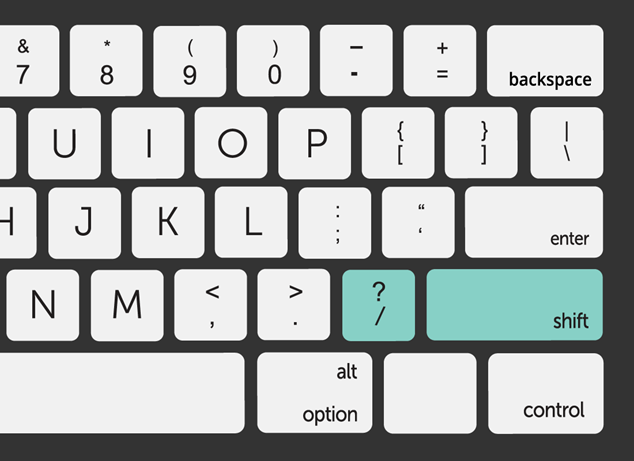
You will note that many of your keyboard’s keys include more than one character, number, or symbol. This is why some of keys enable you to input several characters, and the Shift key allows you to access the character at the top of the key.
For instance, the question mark key has a forwards slash symbol underneath it. To type the question mark, you must simultaneously press the Shift key and the question mark key.
Shared keys on a keyboard refer to keys that serve multiple functions or purposes, typically achieved through the use of modifier keys such as Shift, Control (Ctrl), Alt, and the Windows key (on Windows keyboards). Here’s an overview:
1. Modifier Keys:
- Modifier keys are keys on a keyboard that modify the function of other keys when pressed in combination with them.
- Common modifier keys include Shift, Control (Ctrl), Alt, and the Windows key (on Windows keyboards).
2. Shift Key:
- The Shift key is used to type capital letters and symbols located above the number keys.
- When pressed in combination with other keys, it modifies the output to produce uppercase letters or access additional symbols on the same key.
3. Control (Ctrl) Key:
- The Control key, often abbreviated as Ctrl, is used to perform various keyboard shortcuts in software applications.
- When pressed in combination with other keys, it triggers specific functions such as copy, paste, undo, and save in many programs.
4. Alt Key:
- The Alt key, short for Alternate, is used to access alternate functions or commands in software applications.
- When pressed in combination with other keys, it enables additional menu options, shortcuts, or commands.
5. Windows Key:
- The Windows key is a key found on Windows keyboards, typically featuring the Windows logo.
- It is used to access the Start menu, open the Windows search bar, and trigger various system shortcuts in Windows operating systems.
6. Function Keys (F1-F12):
- Function keys, labeled F1 through F12, are often shared keys that serve different functions depending on the context or software application.
- They can be used to perform tasks such as opening help menus, adjusting volume and brightness, toggling wireless connectivity, and executing system commands.
7. Navigation Keys:
- Navigation keys, including the arrow keys (Up, Down, Left, Right) and Home, End, Page Up, and Page Down keys, serve multiple functions depending on the context.
- They are commonly used for cursor movement, scrolling, and navigation within documents, web pages, and spreadsheets.
8. Numeric Keypad:
- On keyboards with a numeric keypad, the keys on the right side of the keyboard can serve as both numeric keys and additional navigation or editing keys when Num Lock is toggled on or off.
In summary, shared keys on a keyboard allow users to perform various functions and commands by pressing combinations of keys, enhancing productivity and efficiency when typing and interacting with software applications. These keys provide versatility and flexibility in keyboard input, enabling users to access a wide range of functions without the need for additional physical keys.
