
The digital mouse
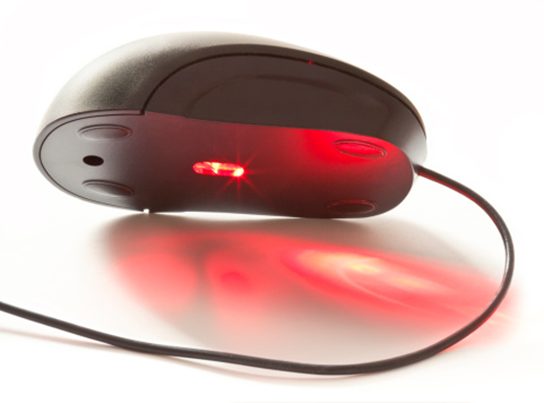
Instead of a ball, the current digital mouse employs a laser to detect movement. This sort of mouse often does not require a mouse pad, although you may find it simpler to use with one.
A digital mouse with a connection that connects it to a computer is referred to as a wired mouse. A cable-free mouse is called as a wireless mouse.
The digital mouse, also known simply as a computer mouse, is a critical input device used to interact with computers and other digital devices. Here’s an overview of the digital mouse:
1. Definition:
- A digital mouse is a handheld pointing device that translates physical movements into on-screen cursor movements. It typically consists of a plastic shell housing internal components such as sensors, buttons, and a scroll wheel.
2. Functionality:
- The primary function of a digital mouse is to control the movement of the cursor on a computer screen. By moving the mouse on a flat surface, users can navigate graphical user interfaces (GUIs), select objects, and perform various actions.
3. Components:
- Buttons: Most digital mice feature at least two buttons: a primary button (usually the left button) and a secondary button (usually the right button). Some mice also include additional buttons for specific functions or shortcuts.
- Scroll Wheel: Many mice have a scroll wheel located between the primary and secondary buttons. The scroll wheel allows users to scroll vertically through documents, web pages, or other content.
- Sensors: Optical or laser sensors inside the mouse track the mouse’s movement relative to the surface it’s on. These sensors provide precise cursor control and accuracy.
- Cable or Wireless Receiver: Digital mice may connect to a computer via a wired USB cable or wirelessly using a USB receiver or Bluetooth connection.
4. Types of Mice:
- Wired Mouse: Connected to the computer via a USB cable, a wired mouse provides a reliable connection and doesn’t require battery changes.
- Wireless Mouse: Utilizes a wireless connection (typically RF or Bluetooth) to communicate with the computer. Wireless mice offer greater flexibility and freedom of movement but require batteries or recharging.
- Gaming Mouse: Designed specifically for gaming enthusiasts, gaming mice often feature customizable buttons, adjustable sensitivity, and ergonomic designs optimized for long gaming sessions.
5. Usage:
- Pointing: Users move the mouse across a flat surface to control the movement of the cursor on the screen, allowing them to point, click, and interact with graphical elements.
- Clicking: Pressing the primary or secondary buttons on the mouse performs various actions such as selecting objects, opening files, or invoking context menus.
- Scrolling: Rotating the scroll wheel allows users to scroll vertically through content such as web pages, documents, or lists.
6. Ergonomics:
- Ergonomic design considerations aim to make mice comfortable to use for extended periods, reducing the risk of discomfort or strain in the hand, wrist, and arm. Ergonomic mice may feature contoured shapes, textured surfaces, and adjustable sizing options.
7. Evolution:
- The digital mouse has evolved over the years, with advancements in technology leading to improvements in precision, sensitivity, and wireless connectivity. Modern mice may incorporate features such as touch-sensitive surfaces, customizable RGB lighting, and programmable buttons.
The digital mouse is an essential tool for navigating the digital world, providing users with intuitive and precise control over their computers and digital devices. Its versatility, ease of use, and ergonomic design make it indispensable for a wide range of computing tasks.
