
Sound Card
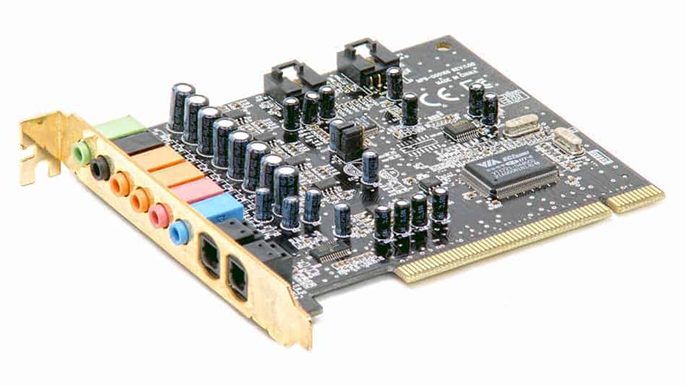
Typically, the motherboard’s integrated sound chip can be used for sound.
However, if you are a fan of sound or like more detailed audio when playing games, you may wish to utilize a sound card.
Sound cards may connect to a computer in a variety of ways. It is possible to connect via USB, PCI slot, or PCI Express x 1 slot.
1. Functionality:
- Audio Processing: The primary function of a sound card is to process audio signals generated by the computer or external devices and convert them into analog signals that can be played through speakers or headphones.
- Sound Generation: Sound cards include digital-to-analog converters (DACs) that convert digital audio files into analog signals for playback, as well as analog-to-digital converters (ADCs) for recording analog audio signals and converting them into digital format.
- Audio Output: Sound cards provide audio output ports for connecting speakers, headphones, or other audio devices, allowing users to listen to music, watch videos, play games, and communicate via voice chat.
- Audio Input: Many sound cards also feature audio input ports, such as microphone and line-in jacks, for recording audio from external sources like microphones, musical instruments, or audio players.
2. Types of Sound Cards:
- Integrated Audio: Integrated or onboard audio refers to sound chips integrated directly into the motherboard of a computer. Most modern motherboards include integrated audio capabilities, eliminating the need for a separate sound card.
- Dedicated Sound Card: Dedicated sound cards are separate expansion cards that can be installed in a computer’s PCIe or PCI slot to enhance audio performance and functionality. They are popular among audiophiles, gamers, and professionals who require high-quality sound reproduction and advanced features.
- External Sound Card: External USB or Thunderbolt sound cards connect to a computer via USB or Thunderbolt ports and provide audio processing and connectivity options similar to dedicated internal sound cards. External sound cards are convenient for laptops and desktops with limited expansion options and may offer improved audio quality and portability.
3. Features of Sound Cards:
- Audio Quality: Sound cards vary in audio quality based on factors such as signal-to-noise ratio (SNR), total harmonic distortion (THD), frequency response, and dynamic range. High-quality sound cards offer cleaner audio output with less distortion and noise.
- Surround Sound: Some sound cards support surround sound technologies such as Dolby Digital, DTS:X, and THX for immersive audio experiences in movies, games, and virtual reality applications.
- Gaming Features: Gaming-oriented sound cards may include features like positional audio, virtual surround sound, and customizable audio profiles to enhance gaming performance and immersion.
- Audio Processing: Advanced sound cards may feature built-in audio processing capabilities, such as digital signal processing (DSP), equalization, reverb, and spatial effects, for audio enhancement and customization.
- Connectivity: Sound cards offer various input and output ports for connecting speakers, headphones, microphones, musical instruments, and other audio devices. Common ports include 3.5mm jacks, RCA connectors, optical S/PDIF, and MIDI interfaces.
4. Considerations When Choosing a Sound Card:
- Audio Needs: Consider your audio requirements, such as gaming, music production, multimedia playback, or professional audio editing, when selecting a sound card with the appropriate features and specifications.
- Compatibility: Ensure compatibility with your computer’s operating system, motherboard, and expansion slot type (PCIe or PCI) when choosing a sound card.
- Budget: Sound cards vary in price based on their features, audio quality, and brand. Set a budget and prioritize features that are most important to you within that budget.
- Brand and Reviews: Research reputable sound card manufacturers and read user reviews to assess reliability, performance, and customer satisfaction before making a purchase decision.
Sound cards play a crucial role in audio processing and playback on computers, providing users with high-quality sound reproduction, advanced audio features, and connectivity options for various audio devices. Whether integrated into the motherboard or installed as a separate component, sound cards enhance the overall audio experience for gaming, entertainment, communication, and professional audio applications.
