
What is Phishing? How to Identify Fake Emails
Track Your Course Progress
You are currently studying as a guest. Your course progress and quiz results will not be saved unless you login to your EduCourse account. Login to track your progress and qualify for your certificate.
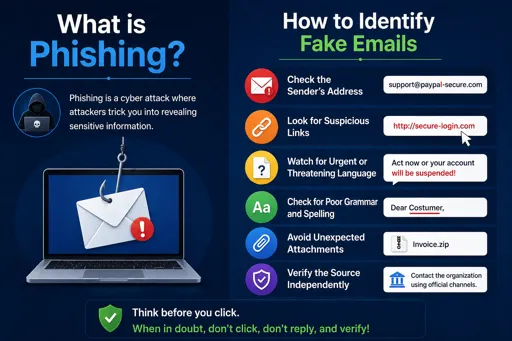
Understanding Phishing and Spotting Fake Emails
What is Phishing? How to Identify Fake Emails is an important question in cyber security. Phishing is when criminals send emails pretending to be from trusted companies or people. Their goal is to trick you into giving personal details like passwords, banking info, or clicking dangerous links.
Phishing emails often look real and official. They may claim there is a problem with your bank account or ask you to update your details urgently. These emails try to create fear or urgency to make you act quickly without thinking.
How to Identify Fake Emails
- Check the sender’s email address: Real companies use official addresses. Watch out for misspelled or strange email domains like @bank-secure.com instead of @bank.co.za.
- Look for spelling and grammar mistakes: Fake emails often contain errors because they are rushed or made by non-native speakers.
- Beware of urgent messages: Phishing emails try to make you panic to act fast. Take your time and do not rush.
- Do not click on links or open attachments: Instead, go directly to the company’s website by typing the address yourself.
- Check greetings and signatures: Most official emails use your full name, not generic greetings like “Dear Customer”.
By understanding what phishing is and learning how to spot fake emails, you protect yourself from cyber attacks. Always stay alert and think before you click.
