
How to Identify a Phishing Email (Real Examples)
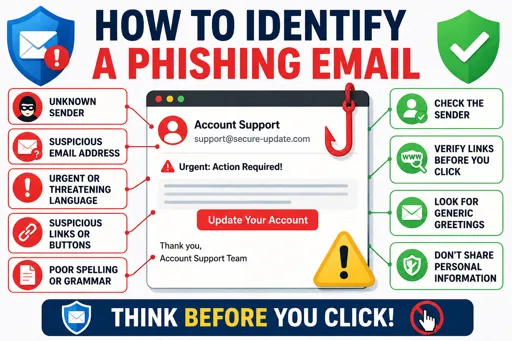
Spotting Phishing Emails Made Simple
Knowing how to identify a phishing email (real examples) helps you stay safe online. Phishing emails try to trick you into giving personal information, like passwords or bank details. These emails often look real but have small errors.
First, check the sender’s email address. Phishing emails usually come from addresses that look strange or don’t match the official company’s address. For example, a bank email might come from “xyz-bank.co.za” instead of “@fnb.co.za.”
Next, look out for poor spelling and grammar. Fake emails often contain mistakes or unusual language that real companies rarely make.
Another sign is urgent or threatening messages, such as “Your account will close if you don’t respond now.” This pressure is meant to rush you without checking carefully.
Also, be careful with links and attachments. Hover over links without clicking to see the real web address. If it doesn’t match what the message says or looks suspicious, don’t click. Attachments could contain harmful software.
Common Red Flags in Phishing Emails
- Sender’s email doesn’t match the company.
- Spelling and grammar errors.
- Urgent calls to action or threats.
- Suspicious links or attachments.
- Requests for personal info via email.
Real companies will never ask for your password or bank details by email. If you’re unsure, contact the company directly using official contact details.
By practising these tips on how to identify a phishing email (real examples), you protect your personal information and avoid scams.
