
How cloud storage works
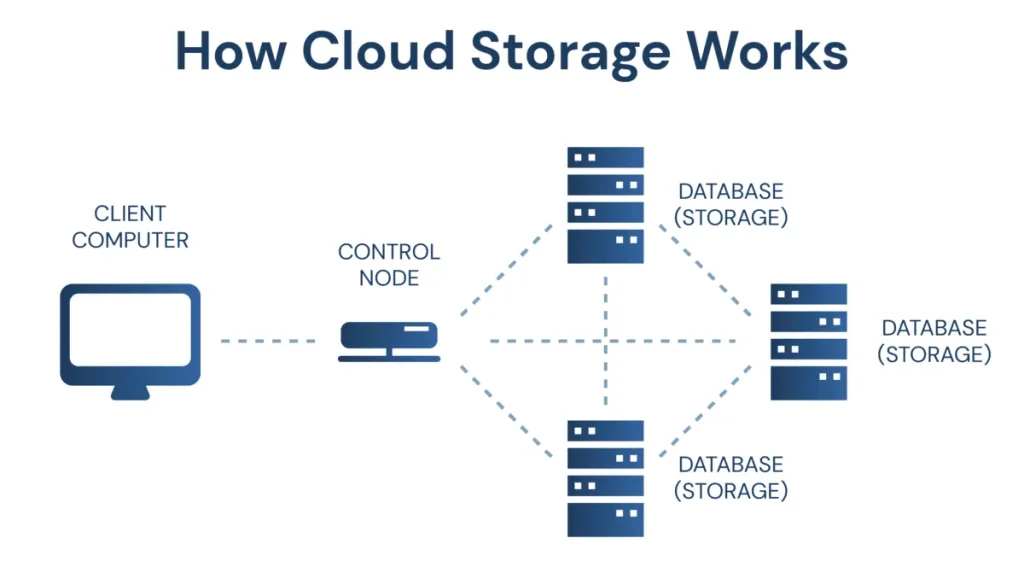
Cloud storage works by saving your files on remote servers instead of keeping them only on your personal device. These servers are powerful computers located in secure data centres around the world. When you upload a file to the cloud, the file is sent over the internet and stored on these servers rather than on your laptop, phone, or tablet. You then access that file by signing in to your account, not by using a specific device.
In simple terms, cloud storage replaces the idea of “this file lives on my computer” with “this file lives online and I can reach it whenever I need it.” When you save a document to cloud storage, your device sends a copy of that file to the cloud service. The cloud service stores it safely and links it to your account. When you open the file later, the system retrieves it from the server and displays it on your screen.
One important part of how cloud storage works is internet communication. Your device and the cloud servers are constantly communicating through the internet. When you upload, download, edit, or delete a file, your action is sent to the server, processed there, and then reflected back on your screen. This happens very quickly, which is why cloud storage often feels almost the same as working with files saved directly on your device.
Cloud storage also uses synchronisation to keep files up to date. If you open a cloud-stored file on one device and make changes, those changes are saved online. When you later access the same file from another device, the updated version is shown automatically. This means you are always working with the latest version of your file, without needing to manually copy or resend it.
Another key part of cloud storage is redundancy and backups. Cloud providers do not store your file in just one place. Instead, copies of your data are often stored across multiple servers or locations. If one server fails, another copy is available. This is one of the reasons cloud storage is considered reliable—it reduces the risk of data loss due to hardware failure, theft, or accidental damage to your personal device.
Security also plays a role in how cloud storage works. When files are sent to and from the cloud, they are protected using encryption. This means the data is scrambled during transfer and storage so that unauthorised users cannot easily read it. Access to cloud storage is usually protected by passwords and additional security measures, ensuring that only approved users can view or edit the files.
Cloud storage is often linked to permissions and sharing. Instead of sending copies of files to other people, you can give them permission to access the same file stored in the cloud. Depending on the permissions set, others may only view the file or be allowed to edit it. All changes are saved in one place, reducing confusion and keeping information organised.
In summary, cloud storage works by saving files on remote servers that are accessed through the internet. Your files are linked to your account, not your device, allowing you to open them from anywhere, keep them automatically updated, and protect them through backups and security systems. Once you understand how cloud storage works, it becomes clear why it is a core part of modern digital tools and online productivity platforms.
