
How to Find Content
Track Your Course Progress
You are currently studying as a guest. Your course progress and quiz results will not be saved unless you login to your EduCourse account. Login to track your progress and qualify for your certificate.
When working with a lot of data in Excel, it can be difficult and time consuming to locate specific information. You can easily search your workbook using the Find feature, which also allows you to modify content using the Replace feature
To find content:
In our example, we’ll use the Find command to locate a specific department in this list.
- From the Home tab, click the Find and Select command, then select Find from the drop-down menu.
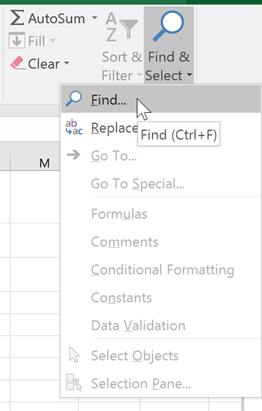
- The Find and Replace dialog box will appear. Enter the content you want to find. In our example, we’ll type the department’s name.
- Click Find Next. If the content is found, the cell containing that content will be selected.

- Click Find Next to find further instances or Find All to see every instance of the search term.

- When you are finished, click Close to exit the Find and Replace dialog box.

You can also access the Find command by pressing Ctrl+F on your keyboard.
Click Options to see advanced search criteria in the Find and Replace dialog box.

