
Using the Spellcheck Tool
Login to save your progress and get your certificate.
Your course progress is only saved when you are logged in.
To use the spelling check feature:
- Right-click the underlined word. A menu will appear.
- Click the correct spelling of the word from the listed suggestions.
- The corrected word will appear in the document.
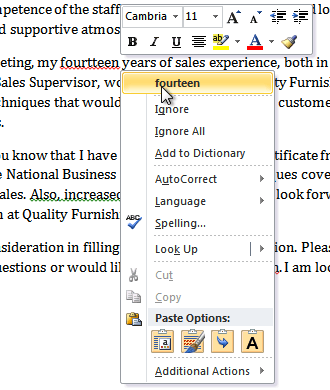
*You can choose to Ignore an underlined word, add it to the dictionary, or go to the Spelling dialog box for more options.
Want to save your place in this course?
Login or register to save progress and work toward your certificate.