
Automatic spelling and grammar checking
Login to save your progress and get your certificate.
Your course progress is only saved when you are logged in.
Automatic spelling and grammar checking
By default, Word automatically checks your document for spelling and grammar errors, so you may not even need to run a separate spelling and grammar check. These errors are indicated by coloured wavy lines.
- The red line indicates a misspelled word.
- The green line indicates a grammatical error.
- The blue line indicates a contextual spelling error. This feature is turned off by default.
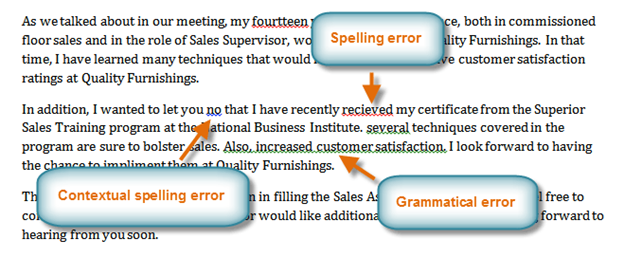
A contextual spelling error occurs when the wrong word is used but the word is spelled correctly. For example, if you write Deer Mr. Theodore at the beginning of a letter, deer is a contextual spelling error because dear should have been used. Deer is spelled correctly, but it is used incorrectly in this letter.
Want to save your place in this course?
Login or register to save progress and work toward your certificate.