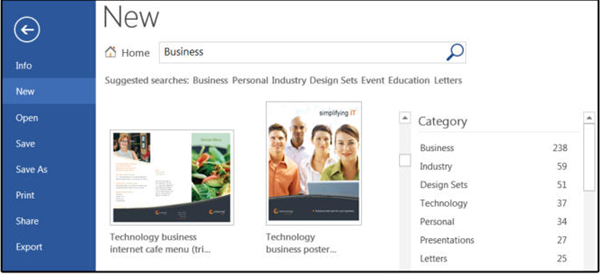
How to access Microsoft Word’s stock templates
Fortunately for us, Microsoft provides many hundreds of templates for all of its programs. Note that most of Microsoft’s templates are online, which means you cannot access them unless you’re connected to the Internet.
To open one of the system-provided templates in Word:
1. Open Microsoft Word and select New.
2. Peruse the Suggested Search categories: Business, Personal, Industry, Design Sets, Events, Education, or Letters. For this exercise, select Business.
3. Word displays a message that says, “Searching thousands of online templates.”
4. Word displays template search results on-screen, plus a comprehensive list of categories in a scrolling panel on the right.
5. Scroll down the page or choose a different category, then select a template that fits your current project.