Microsoft Word Certificate Course Online
Microsoft Word – Basics
1. Microsoft Word – Basics
4 Topics
|
1 Quiz
The Word interface
Microsoft Word Ribbon
The Quick Access Toolbar
Backstage view
Online Quiz for MS Word Basics
2. Understanding OneDrive
2 Topics
|
1 Quiz
Benefits of using OneDrive
Saving and opening files
Understanding OneDrive – Quiz
3. Creating and Opening Documents
3 Topics
|
1 Quiz
To create a new blank document
To create a new document from a template
To open an existing document
Creating and Opening Documents – Quiz
4. Saving Documents
2 Topics
|
1 Quiz
Save and Save As
Exporting documents
Saving Documents – Quiz
5. Formatting Text in Word
2 Topics
|
1 Quiz
How to Format Text in Word
How to Change Capitalization in Word
Formatting Text in Word – Quiz
6. Editing text
1 Topic
|
1 Quiz
Edit Text
Editing text – Quiz
7. Paragraphs
1 Topic
|
1 Quiz
How to Format Paragraphs
Paragraphs – Quiz
8. Spelling and Grammar
4 Topics
|
1 Quiz
Understanding the Spellcheck tool
Automatic spelling and grammar checking
Using the Spellcheck Tool
Using the Grammar Tool
Spelling and Grammar – Quiz
9. Customize Ribbon
4 Topics
|
1 Quiz
What can you customize?
Hide or show your ribbon
Rename a tab, group, or command
Change the order of default or custom tabs and groups
Customize Ribbon – Quiz
10. Saving and Using Templates in Word
3 Topics
|
1 Quiz
How to access Microsoft Word’s stock templates
Saving and Using Templates
How to create custom templates in Word
Using Templates – Quiz
11. When to use AutoCorrect
3 Topics
|
1 Quiz
Understanding AutoCorrect
Disabling AutoCorrect
Customise AutoCorrect Features
AutoCorrect Features – Quiz
Previous Topic
Next Lesson
Change the order of default or custom tabs and groups
Login to save your progress and get your certificate.
Your course progress is only saved when you are logged in.
Login or Register
Microsoft Word Certificate Course Online
9. Customize Ribbon
Change the order of default or custom tabs and groups
In the
Customize the Ribbon
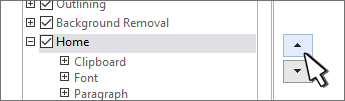
window, select the tab or group that you want to move.
Select the
Move Up
or
Move Down
arrow until you have the order you want.
Want to save your place in this course?
Login or register to save progress and work toward your certificate.
Login or Register
Previous Topic
Back to Lesson
Next Lesson
×
Save your progress
Login or create a free account to save your course progress and get your certificate.
Login
Register