
Using the Spellcheck Tool
Track Your Course Progress
You are currently studying as a guest. Your course progress and quiz results will not be saved unless you login to your EduCourse account. Login to track your progress and qualify for your certificate.
To use the spelling check feature:
- Right-click the underlined word. A menu will appear.
- Click the correct spelling of the word from the listed suggestions.
- The corrected word will appear in the document.
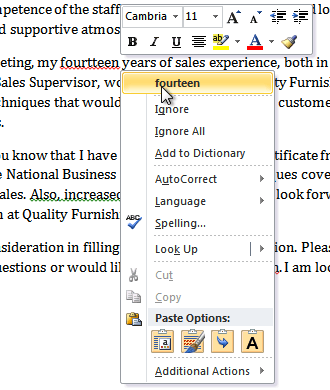
*You can choose to Ignore an underlined word, add it to the dictionary, or go to the Spelling dialog box for more options.
