Change the order of default or custom tabs and groups
Track Your Course Progress
You are currently studying as a guest. Your course progress and quiz results will not be saved unless you login to your EduCourse account. Login to track your progress and qualify for your certificate.
Change the order of default or custom tabs and groups
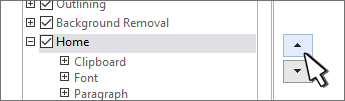
- In the Customize the Ribbon window, select the tab or group that you want to move.
- Select the Move Up or Move Down arrow until you have the order you want.