
Automatic spelling and grammar checking
Track Your Course Progress
You are currently studying as a guest. Your course progress and quiz results will not be saved unless you login to your EduCourse account. Login to track your progress and qualify for your certificate.
Automatic spelling and grammar checking
By default, Word automatically checks your document for spelling and grammar errors, so you may not even need to run a separate spelling and grammar check. These errors are indicated by coloured wavy lines.
- The red line indicates a misspelled word.
- The green line indicates a grammatical error.
- The blue line indicates a contextual spelling error. This feature is turned off by default.
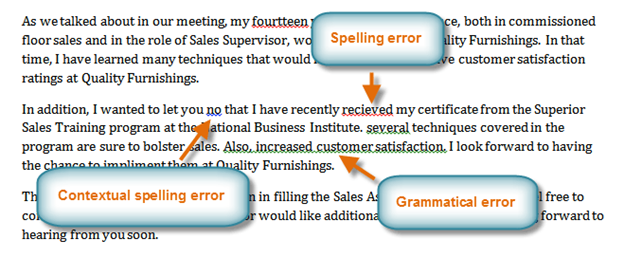
A contextual spelling error occurs when the wrong word is used but the word is spelled correctly. For example, if you write Deer Mr. Theodore at the beginning of a letter, deer is a contextual spelling error because dear should have been used. Deer is spelled correctly, but it is used incorrectly in this letter.
