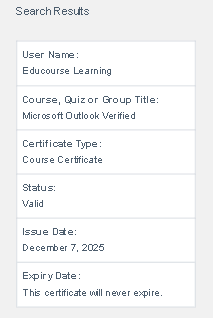
This guide explains how to verify an EduCourse certificate using either the QR code or the certificate registration number. It shows how scanning the QR code or entering the reference number leads to the official verification page, where the certificate details can be confirmed as authentic and valid.
Option 1: Scan QR Code
The easiest method is by simply scanning the QR Code which is located at the top right corner of a certificate.

Option 2: Manual Verification
Copy the Certificate Registration number as is. Your registration number is located on the top right above the QR Code. Be sure not to miss any digit.

Access Verification Tool
From the menu, choose Verify Certificate

Enter the Registration Code
In the verification tool, enter your certificate registration number and click search.
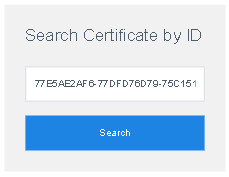
Credentials Verified
If your certificate is valid, your Student Name, Couse Name, Certificate Type, Status, Issue Date and Expiration Date will be shown in the results.