
Applying Rules and Keeping Your Messages Organized
Rules can save you a lot of time by automatically performing commands like moving or deleting messages as they arrive. For example, if you always move emails from a certain person to a folder, you could create a rule to do this automatically. You can create rules that look for a specific sender, recipient, subject, or specific words that are contained in the body of the email.
To create a new rule:
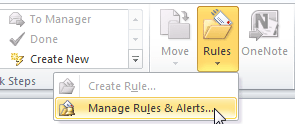
- Locate and select the Rules command on the Ribbon, then select Manage Rules & Alerts… from the drop-down menu.
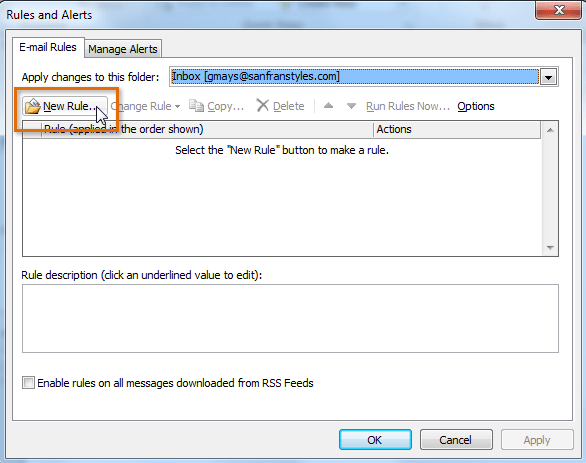
- The Rules and Alerts dialog box will appear.
- Click the New Rule… button.
- The Rules Wizard will appear. Follow the instructions to create a new rule.

Keeping your messages organized
Even with folders, categories, and rules, it can be difficult to keep up with each message you receive. Review some of the strategies below to learn how to manage your messages more effectively.
Using flags
As you respond to different messages throughout the day, some may prove to be more time sensitive than others. If you want to make sure you respond to urgent messages quickly, you can use flags. Flags create a task associated with the message, which will prompt you with reminders until the task is complete.
To apply a flag:
- Select the desired message, then click the Follow Up command on the Ribbon.
- Choose the deadline for the task from the drop-down menu.

- The flag will be applied. To mark the task as complete, click the flag, then select Mark Complete from the drop-down menu.
