
Exporting and Sharing Presentations
Exporting presentations
By default, PowerPoint presentations are saved in the .pptx file type. However, there may be times when you need to use another file type, such as a PDF or PowerPoint 97-2003 presentation. It’s easy to export your presentation from PowerPoint to a variety of file types.
- PDF: This saves the presentation as a PDF document instead of a PowerPoint file.
- Video: This saves the presentation as a video.
- Package for CD: This saves the presentation in a folder along with the Microsoft PowerPoint Viewer, a special slide show player anyone can download.
- Handouts: This prints a handout version of your slides.
- Other file type: This saves in other file types, including PNG and PowerPoint 97-2003.
To export a presentation:
In our example, we’ll save the presentation as a PowerPoint 97-2003 file.
- Click the File tab to access Backstage view.
- Click Export, then choose the desired option. In our example, we’ll select Change File Type.

- Select a file type, then click Save As.

- The Save As dialog box will appear. Select the location where you want to export the presentation, type a file name, then click Save.

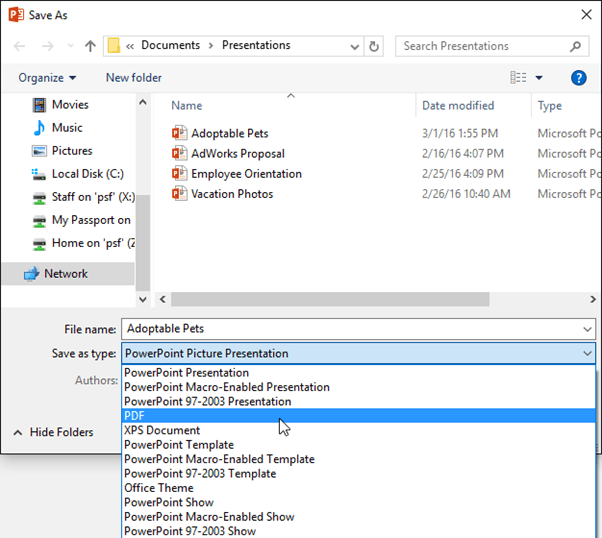
You can also use the Save as type drop-down menu in the Save As dialog box to save presentations in a variety of file types. Be careful to choose a file type others will be able to open.
Sharing presentations
PowerPoint makes it easy to share and collaborate on presentations using OneDrive. In the past, if you wanted to share a file with someone you could send it as an email attachment. While convenient, this system also creates multiple versions of the same file, which can be difficult to organize.
When you share a presentation from PowerPoint, you’re actually giving others access to the exact same file. This lets you and the people you share with edit the same presentation without having to keep track of multiple versions.
In order to share a presentation, it must first be saved to your OneDrive.
To share a presentation:
- Click the File tab to access Backstage view, then click Share.

- PowerPoint will return to Normal view and open the Share panel on the right side of the window. From here, you can invite people to share your document, see a list of who has access to the document, and set whether they can edit or only view the document.

