
Starting and Managing Conversations in ChatGPT
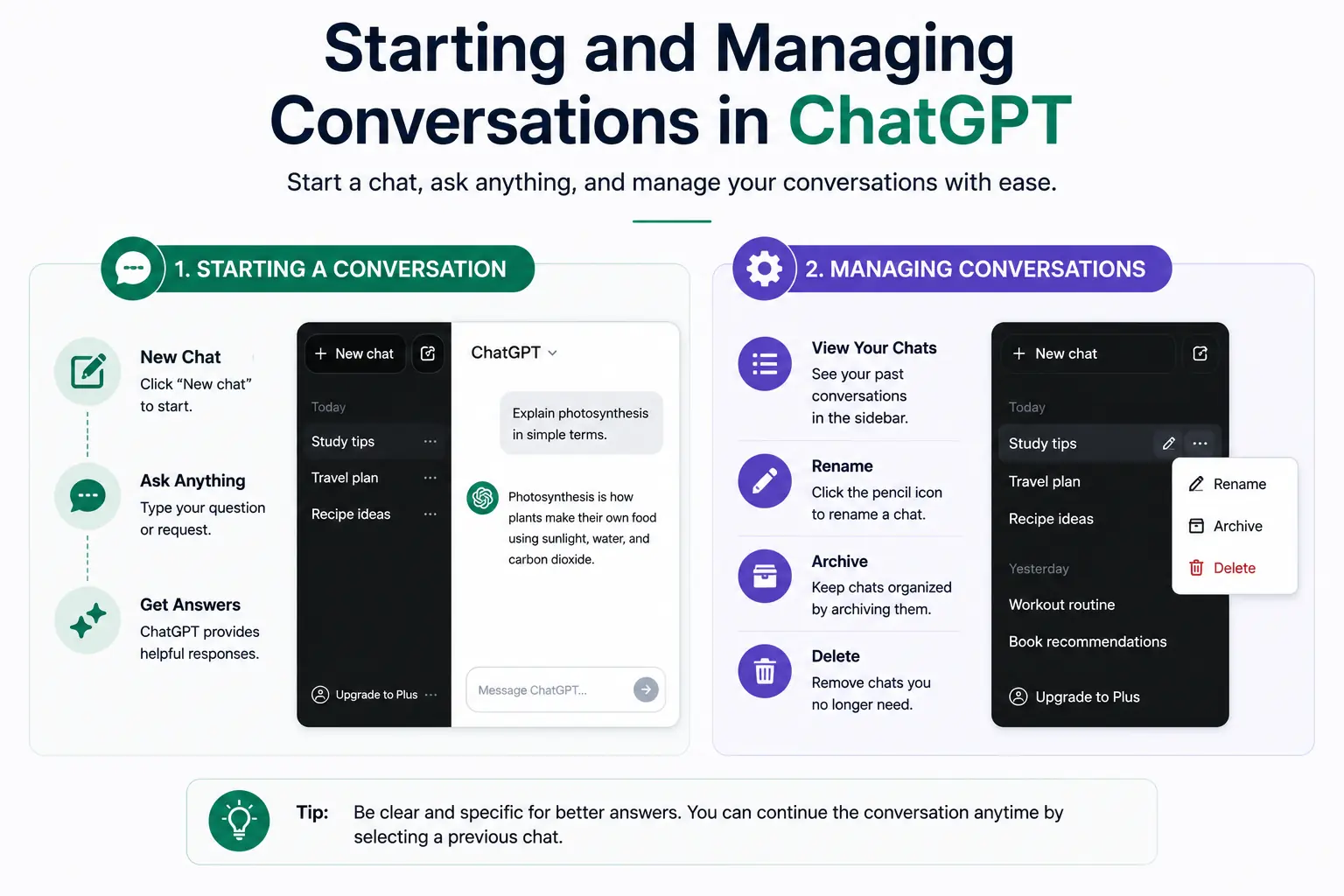
How to Begin and Keep ChatGPT Conversations Going
Starting and Managing Conversations in ChatGPT is simple and useful for learners who want quick answers or help with tasks. When you use ChatGPT, each chat is a new conversation where you can ask questions, get explanations, or write text. It feels like talking to a helpful assistant. Below, you will learn how to begin and control your conversations for the best experience.
Starting a New Conversation
To start a new conversation, click or tap the “New Chat” button. This clears any previous chat and lets you begin fresh. You can type your question or command in the text box and press enter or send. It’s important to be clear and specific so ChatGPT understands what you want. For example, instead of typing “help,” say “help with a maths question.”
Starting a fresh chat is good when you want to switch topics or focus on one subject without confusion from earlier messages. Each new conversation does not remember what you asked before, so it works like a clean page.
Managing Your Conversations
Managing conversations means how you keep track, edit, or get back to chats inside ChatGPT. Here are tips to do this well:
- Save Important Chats: Bookmark useful conversations in your browser or copy and paste the text to a document. This way, you don’t lose valuable information.
- Use Chat History: Some ChatGPT versions save your previous chats. You can click the chat on the side panel to open and continue the conversation if the system allows it.
- Edit Your Input: If ChatGPT’s answer is unclear or wrong, rephrase your question or add more details. This helps get better results.
- Keep Conversations Clear: Avoid mixing many questions in one message. Instead, ask one question at a time for clearer answers.
Learning how to start and manage conversations helps you get more from ChatGPT. Remember, each conversation is private and only you can see it. Always keep your login details safe to protect your account.
With practice, you’ll find that managing your chats makes ChatGPT easier and faster to use. Whether you use it for school work, writing, or learning new facts, this skill will improve your experience.
Live Scenario • Active Situation
You are an administrative assistant at a busy office, tasked with quickly getting accurate information from ChatGPT to prepare a report for your manager.
There is no single perfect answer. Choose what you would do in this situation.
